
- Owners
- Staff
Invite your staff
Send someone an invitation to your team, with their role and how long the invitation lasts.
Checked against Sitemapper on
Owners and managers can invite people to the team. Each invitation is for one email address and one role.
Send an invitation
- In the portal, open Staff & Permissions from the side menu.
- Choose Invite Staff.
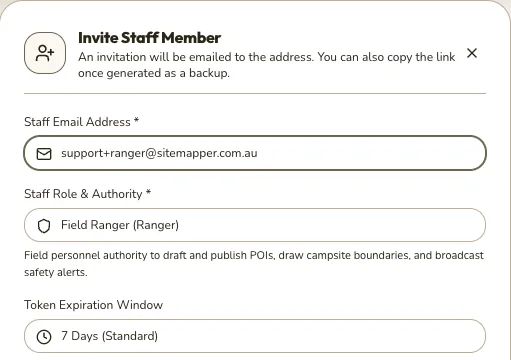
- In Staff Email Address, type the address of the person you're inviting. They must sign up with exactly this address.
- In Staff Role & Authority, choose their role. An owner can choose Campground Owner, Park Manager, Field Ranger or Read-Only Auditor. A manager can choose any of those except Campground Owner. The role's description shows underneath.
- In Token Expiration Window, choose how long the invitation lasts: 3, 7, 14 or 30 days. Seven days is chosen to start with.
- Choose Generate Invitation.
The window says Invitation Generated Successfully, and an email goes to the person with an Accept invitation button.
Keep a copy of the link
The window also shows the Invitation Link. Choose Copy Link and keep it until the person has joined, or send it to them another way if the email doesn't reach them. The link is shown only this once.
Then choose Done.
Pending invitations
Invitations that haven't been accepted show on the Staff Roster tab as Pending Invite, with the date sent and the date they expire. One that has run out shows Expired. There's no resend button: to send it again, cancel the old invitation and send a new one.
If something goes wrong
- The email didn't arrive. Send the person the link you copied. If you've lost it, cancel the invitation on the Staff Roster tab and send a new one.
- The person signed up with a different address. The invitation won't work for that address. They should sign up again from the same link with the address you invited. See Join a team you've been invited to.
Still stuck? Email us and tell us what you were trying to do.