
- Owners
- Staff
What each role can do
The four roles on a team, and what each one can view and change.
Checked against Sitemapper on
Everyone on a team has one of four roles. You choose it when you invite them, and it can't be changed after they join.
See it in the portal
- Open Staff & Permissions from the side menu.
- Choose the Permissions Matrix tab. Anyone on the team can open it.
- The table headed What each role can do shows five parts of your property, each with a View row and a Change row.
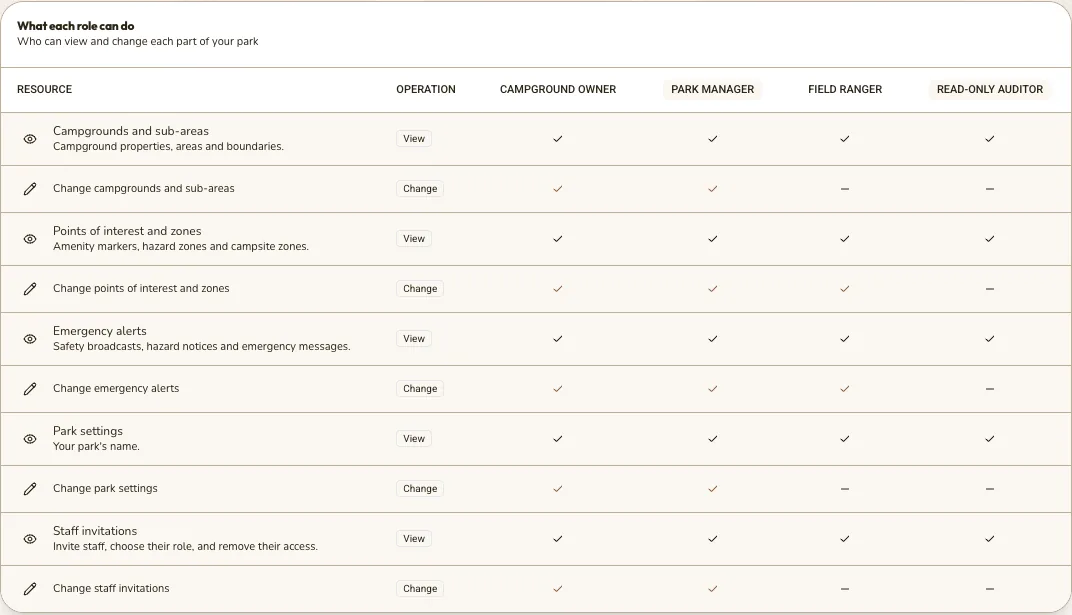
Choose a role's card above the table to pick out its column. Choose Show all roles to see them all again.
The four roles
| Campground Owner | Park Manager | Field Ranger | Read-Only Auditor | |
|---|---|---|---|---|
| View everything below | Yes | Yes | Yes | Yes |
| Change campgrounds and sub-areas | Yes | Yes | No | No |
| Change points of interest and zones | Yes | Yes | Yes | No |
| Change emergency alerts | Yes | Yes | Yes | No |
| Change park settings | Yes | Yes | No | No |
| Change staff invitations | Yes | Yes | No | No |
In short:
- Campground Owner can do everything, and can invite any role.
- Park Manager can do everything an owner can on the map. On the team, they can invite managers, rangers and read-only staff, but can't invite an owner or cancel an owner's invitation. They can reset two-factor sign-in for a ranger or read-only member who has lost their authenticator; an owner can also reset a manager's.
- Field Ranger can add and change places and zones, and send emergency alerts. They can't change the property's outline or settings, or invite anyone.
- Read-Only Auditor can look at everything and change nothing.
The role names are the same whatever kind of property you run.
Still stuck? Email us and tell us what you were trying to do.