
- Owners
- Staff
Map where there's phone signal
Tell Sitemapper whether phones work across your property, and draw the areas where they do.
Checked against Sitemapper on
When a visitor asks for help with no signal, Sitemapper shows them the nearest place their phone works. That only helps if you've marked where phones work.
Answer the question
You're asked when you set up your property: How is mobile coverage across this site?
- Full coverage across the whole site: phones work everywhere inside your boundary. Then tick the networks that work.
- Partial coverage: phones work in some places. Next, you draw them.
- No reliable coverage: phones don't reliably work anywhere.
To change your answer later, choose the coverage chip at the top of the map editor. Only owners and managers can change the answer. For a field ranger the buttons look as if they work, but the change isn't kept. Field rangers can still draw areas with Add place and the Mobile Coverage tile.
If you haven't answered yet, the chip says Phone coverage not marked. Choose Mark now, then Mark coverage now to draw areas, or My site has no reliable mobile coverage anywhere. To choose full coverage from here, answer first, then open the chip again, choose Full coverage across the whole site, tick the networks that work, and choose Save full coverage.
Draw where phones work
- Choose Mark coverage now, or Add place and the Mobile Coverage tile. A panel titled Draw where phones work opens.
- Click around the area where visitors get a signal. Undo corner takes back the last one.
- Choose Finish area.
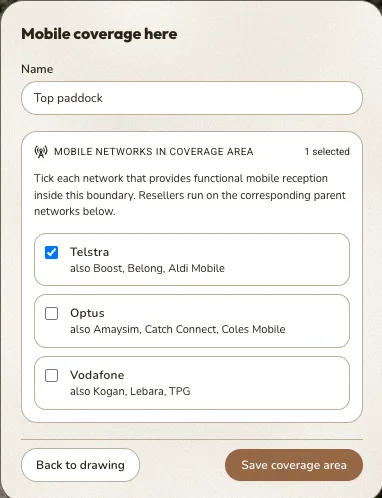
- In Mobile coverage here, give it a name visitors will recognise, such as "Top of the hill", and tick each network that works there.
- Choose Save coverage area.
Mark what you've checked yourself, on the networks you've tested. Visitors will walk to these places to ask for help.
Still stuck? Email us and tell us what you were trying to do.