
- Owners
- Staff
- Visitors
Send an emergency alert, and what visitors see
Write and send an alert to visitors at your property, what it reaches, and how to take it down.
Checked against Sitemapper on
An alert shows a message at the top of the map on visitors' phones. Owners, managers and field rangers can send one.
What an alert does, and what it doesn't
- It goes to everyone at your property who has Sitemapper open and has signal. You can't choose who gets it.
- It reaches a phone only while Sitemapper is open on it. There's no phone notification, so a visitor with the app closed won't see it until they open the map.
- The number shown when you send is the parties on your roll call that day, not the number of phones that received it.
- Sitemapper doesn't record who saw an alert.
Use an alert alongside your own way of reaching people, not instead of it.
Send one
- In the portal, open Safety Radar and choose Broadcast Composer & Alerts, or choose Dispatch Emergency Broadcast on any Safety Radar page. Choose your property in the header, not one of its areas.
- Start from a template under Start from a template, or choose Or create your own for a blank message. Read every word of a template and change it to fit your property: templates name places and facilities your property may not have.
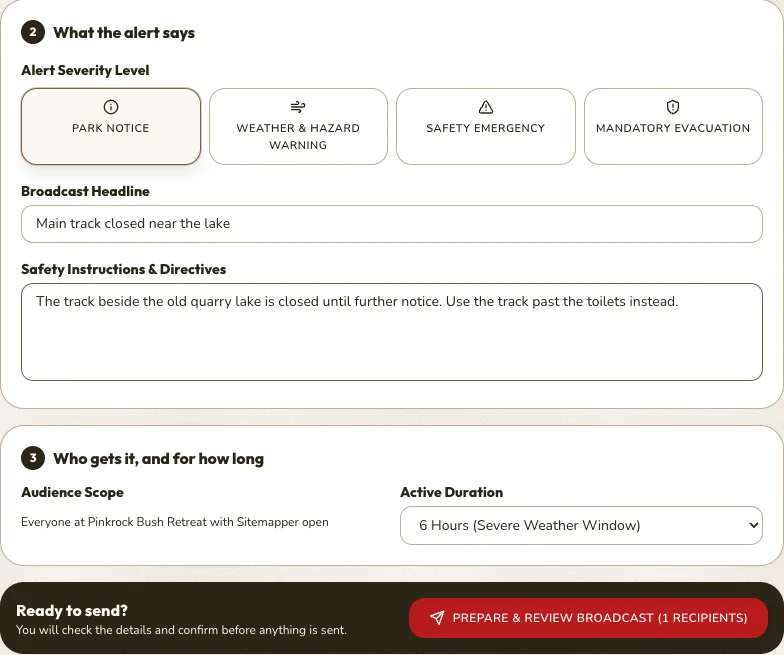
- Under What the alert says, choose the Alert Severity Level, and write the Broadcast Headline and Safety Instructions & Directives. Keep both short: the phone shows one line of each until the visitor opens it.
- Choose Prepare & Review Broadcast.
- Check the details, tick the box to confirm, and choose Authorize & Transmit.
Take it down
An alert stays on visitors' phones until you take it down, whatever you chose under Active Duration.
- On Broadcast Composer & Alerts, find it under Dispatched Broadcasts.
- Choose Deactivate.
A phone that opens the map after this doesn't show the alert. A phone that's already showing it keeps the banner until the visitor chooses Acknowledge or closes and reopens Sitemapper.
What a visitor sees
A red banner across the top of the map, with the alert's level, headline and message. Tapping Details shows the full message. Acknowledge hides the banner on that phone. Nothing is sent back to you.

Still stuck? Email us and tell us what you were trying to do.