
- Owners
- Staff
Who is staying, and the arrival details visitors give
Read the roll call of visitors' declared stays, mark a party as gone, and export the details.
Checked against Sitemapper on
Before a visitor uses your map, the app asks for their name, vehicle registration, and the dates they're arriving and leaving. These arrival details appear on Safety Radar.
What the visitor is told
The visitor sees this before they give their details:
The details don't include a phone number or where the visitor is.
The roll call
- Open Safety Radar and choose Occupancy Roll-Call.
- The list shows parties whose declared dates cover today, and parties whose leaving date has passed by less than the Grace period. Filter it with On Site, Overstay Alerts or All Registered, or search by name or registration.
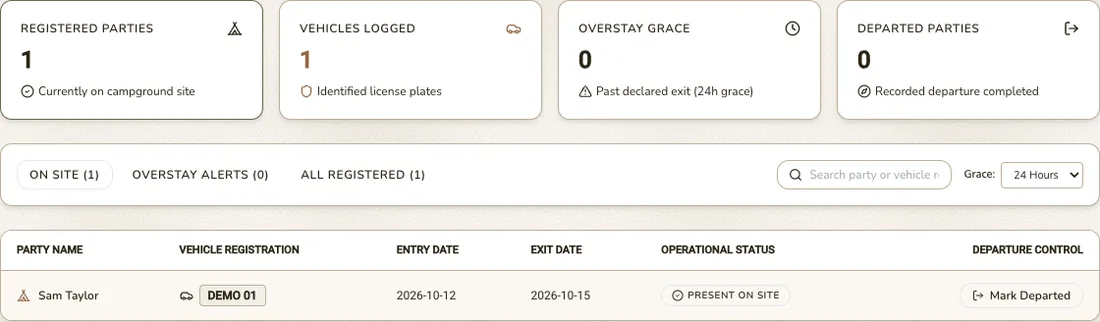
The roll call goes by the dates visitors declared, not by where anyone actually is. A party that left early still shows until you mark them gone or their leaving date passes. A party still here after their leaving date shows for the Grace period you choose, then drops off the roll call whether or not anyone marked them gone. Overstay Alerts lists the parties inside that grace period. It doesn't send an alert to anyone.
Mark a party as gone
Choose Mark Departed on their row. This records the time. Nothing is sent to the visitor. If you marked the wrong party, choose Undo Departure.
Read-only staff see the button, but it doesn't work for them.
The full register, and exporting it
- Open Safety Radar and choose Declarations Registry.
- Use the tabs All Records, Present, Departed and Upcoming, or search.
- The Departed tab shows both Left (confirmed), for parties someone marked as gone, and Stay ended, not confirmed, for parties whose leaving date has passed but nobody marked them.
- To export, choose Export Declarations CSV. It exports the rows the current tab and search are showing.
Each export is recorded in the property's records. An exported file is yours to look after: Sitemapper doesn't delete it.
Read-only staff can't export.
Still stuck? Email us and tell us what you were trying to do.