
- Owners
- Staff
When a visitor asks for help
Where a visitor's help request appears, how to acknowledge and close it, and what is deleted when you close it.
Checked against Sitemapper on
A visitor can ask for help from the Sitemapper app, with or without their location. Their request appears on Safety Radar in the portal.
Where a request appears
- In the portal, open Safety Radar and choose your property in the header. Choose the property itself rather than one of its areas.
- The Incident Location Panel card shows how many requests are open, and the strip at the top shows Open Incidents.
- While Safety Radar is open, a new request also shows a banner: New Visitor Emergency Help Request Received, with the visitor's name if they gave one. Choose View Incident to open it.
Each request shows the visitor's name and vehicle registration if they gave them, and where they were when they asked if they shared their location. Choose View Map to see that spot in Google Maps.
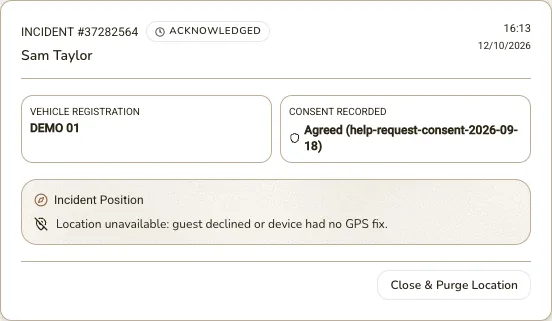
Read-only staff can see that a request exists but not where the visitor is.
Acknowledge it
When someone is going to the visitor, choose Acknowledge Request. This marks the request as being dealt with for your team.
Only acknowledge when someone is actually on their way. Once a request is acknowledged, the visitor can no longer withdraw it, and if they tap Ask a ranger again it starts a new request.
Close it
- When the visitor has been helped, or it was a false alarm, choose Close & Purge Location.
- Write what happened in Resolution Note & Actions Taken. This is required.
- Choose Confirm Resolution & Clear Location.
What closing deletes
Closing a request deletes the visitor's location, their name and their vehicle registration. This also happens when the visitor withdraws a request themselves. What stays is the time it was raised, who closed it and when, and your note.
After closing, the card shows No safety declaration on file because the name has gone. That's expected.
Still stuck? Email us and tell us what you were trying to do.